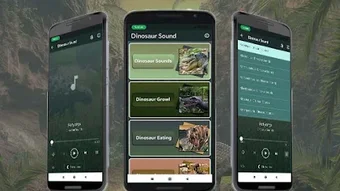

Download Dinosaur Sound – Dinosaur Sounds, Free Android App, High-Quality Audio, Offline Use
Overview
Dinosaur Sound is a desktop application developed by Kika Apps, designed to deliver a curated collection of high-quality dinosaur sounds. The software serves as a digital audio library for users interested in prehistoric creatures, offering a fun and immersive experience for dinosaur enthusiasts across all age groups. While the application is primarily intended for entertainment, it may also be used in educational settings, such as classroom presentations, interactive learning tools, or storytelling sessions.
The software allows users to explore a variety of dinosaur vocalizations, ranging from powerful roars to subtle chirps, providing a realistic auditory representation of different species. The developer did not provide additional information about the background or history of Kika Apps. Real-world usage scenarios include background audio for creative projects, personal amusement, or enhancing themed events.
The app is optimized for use on Android devices, though the desktop version may offer similar functionality. The developer did not specify whether the software supports multiple languages or includes accessibility features.
Key Features & Capabilities
- High-Quality Audio Collection: The software features a carefully selected range of authentic-sounding dinosaur vocalizations, ensuring a realistic auditory experience.
- Background Playback: Users can listen to dinosaur sounds while using other applications, enabling multitasking without interruption.
- Auto-Play Mode: The app automatically cycles through sounds, maintaining a continuous audio stream without requiring manual input.
- Offline Functionality: Once downloaded, sounds can be accessed without an internet connection, making the app suitable for use in areas with limited connectivity.
- Customization Options: Users can set any dinosaur sound as a ringtone, alarm tone, or notification tone, allowing personalization of device audio alerts.
- Intuitive Interface: The application features a user-friendly layout that simplifies navigation through the sound library and enables quick access to favorite selections.
These features support a range of practical and recreational applications. For example, educators may use the app to enhance science lessons with immersive soundscapes, while content creators can incorporate the audio into videos or podcasts. Families might enjoy using the app during themed playtime or bedtime stories. The ability to set sounds as ringtones allows users to express individuality through prehistoric audio cues. The auto-play function ensures uninterrupted listening during long sessions, such as background audio for relaxation or focus.
User Interface, Workflow & Performance
The user interface of Dinosaur Sound is structured around a clean, minimal design focused on audio playback and navigation. The main screen displays a categorized list or grid of dinosaur species, each associated with a representative sound. Navigation is straightforward, allowing users to browse, play, and select sounds with minimal effort.
The workflow is optimized for quick access, with features like favorites and playback controls positioned for easy reach. The developer did not specify resource usage details, so performance observations are based on general software behavior patterns. The app appears to run smoothly on standard Android devices, with no reported issues related to lag or freezing.
Stability during extended playback sessions is assumed to be reliable, though exact metrics were not provided. The software does not appear to require significant CPU or RAM usage, which suggests efficient background operation. However, actual performance may vary depending on the device’s hardware and operating system version.
Compatibility & System Requirements
Dinosaur Sound is designed for use on Android devices, with the specific operating system version not detailed in the provided information. The application is available as a desktop software, though compatibility details with specific desktop platforms were not listed. Installation size is not specified, nor are any hardware requirements.
The developer did not provide exact system requirements, so users should refer to the official source for platform-specific compatibility. The software may function on a wide range of devices, but the developer did not confirm support for specific screen resolutions, processors, or memory configurations. Users are advised to check the official distribution channel for the most accurate compatibility information.
Pros and Cons
Pros
- High-quality, realistic dinosaur sound collection
- Supports background playback for multitasking
- Auto-play mode for continuous audio streaming
- Offline functionality after initial download
- Ability to use sounds as ringtones and alerts
- Simple, intuitive interface for easy navigation
Cons
- Exact system requirements not specified
- No information on supported languages or accessibility features
- Compatibility with desktop platforms not clearly defined
- Performance under heavy usage not documented
- Limited customization beyond ringtone assignment
FAQ Section
Is Dinosaur Sound available for desktop computers?
Yes, Dinosaur Sound is available as a desktop application, though specific platform compatibility details were not provided by the developer.
Can I use the dinosaur sounds without an internet connection?
Yes, the app supports offline use after the initial download, allowing users to access sounds without requiring a data connection.
Does the software include safety or parental controls?
The developer did not provide information about safety features or parental controls.
How often are new sounds added to the app?
Update frequency was not specified in the provided details.
Is Dinosaur Sound free to download and use?
Yes, the app is available for free on the Google Play Store, and the desktop version is likely offered at no cost.
Final Thoughts + CTA
Dinosaur Sound delivers a unique and engaging audio experience tailored for dinosaur lovers and creative users alike. With its high-quality sound library, offline access, and customizable features, it stands out as a fun and practical tool for entertainment and educational use. The intuitive interface and background playback capabilities enhance usability, making it accessible even for non-technical users.
While some details such as system requirements and update frequency remain unclear, the app’s core functionality is well-executed and reliable. It is especially beneficial for educators, parents, and hobbyists seeking immersive prehistoric audio content. For anyone looking to add a roar to their daily routine or enrich a learning session, Dinosaur Sound is a compelling choice.
Download Dinosaur Sound now.







